Partner Onboarding

Who is this for - Partners with an approved agreement to onboard merchants on Paymob's behalf, rather than merchants onboarding themselves.
Outcome - Understand how partner onboarding differs from a standard merchant integration, and walk through the full flow from setup to merchant status checks.
Last Updated Date - October 1, 2026
Overview
In a standard merchant integration, a merchant signs up and completes onboarding themselves through Paymob's own onboarding UI. Partner onboarding is different: as a partner, you register merchants and drive them through the onboarding flow from your own system, using your Partner API Key instead of merchant-level credentials. You control the experience end to end; Paymob never presents its onboarding UI to the merchant directly.
Partner onboarding requires an approved partner agreement with Paymob. If you don't have one yet, you can't use this flow. You can contact support@paymob.com or your partnership manager to check availability.
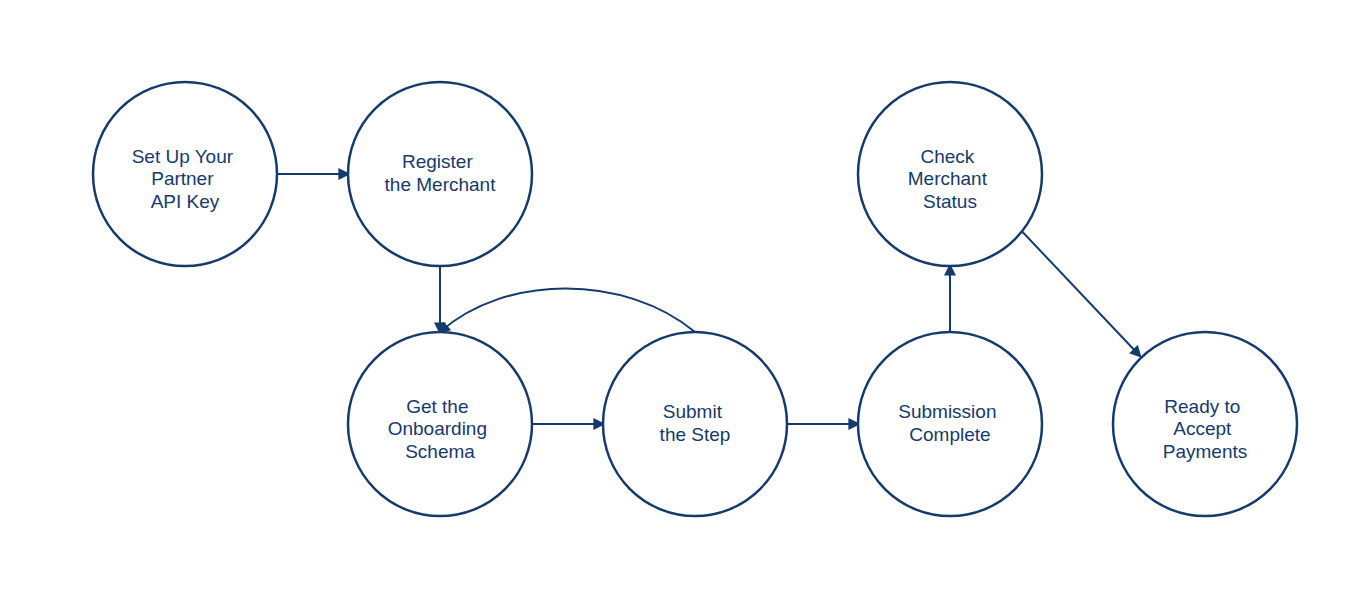
One-Time Setup
Before onboarding any merchants, generate a Partner API Key. This is a one-time step that authenticates your system as a partner, and every onboarding request afterward is made using this key.
Store your Partner API Key securely; it authorizes every onboarding request you make, and it won't be shown again after it's generated.
Onboarding a Merchant
Once you have your Partner API Key, onboarding a merchant follows four steps.
1
Register the Merchant
Create the merchant on Paymob's system using their basic details. This returns a unique Merchant ID (MID) you'll use in every subsequent call.
2
Get the Onboarding Schema
Request the onboarding flow's current step for this merchant. The schema tells you which fields and documents are required next.
3
Submit the Step
Submit the data and documents for the current step, matching the fields the schema returned.
Steps 2 and 3 repeat until the response indicates the merchant has reached the final step. Whether each submission covers a single step or several at once depends on your agreement with Paymob and your use case.
4
Check Merchant Status
Once onboarding is completely submitted, check the merchant's onboarding and legal status at any time to confirm they're ready to accept live payments.
Where to Go Next
See the full API reference for each step in this flow |


On this page
- Partner Onboarding