Refund

Who is this for - Product managers, business owners, and stakeholders who need a high-level overview of refund transactions and how they are handled through Paymob
Outcome - Understand what refund transactions are, when to use them, and how to initiate refunds using the Paymob Dashboard
Last Updated Date - June 1, 2026
What is a Refund?
A refund is a transaction that returns all or part of a previously successful payment to the customer. Refunds are always linked to an original transaction and cannot exist on their own.
Refunds can be:
- Full refunds – returning the entire transaction amount
- Partial refunds – returning only part of the original amount

Common Use Cases
Refunds are typically used when:
- An order is canceled after payment
- A customer returns a product
- A service cannot be fulfilled
- An incorrect amount was charged
- Customer support approves a compensation request

Payment methods that refund is supported for:
All payment methods except Kiosk
Important Considerations
- Refunds are always tied to a successful transaction
- The refunded amount is returned to the same payment method
- Processing time may vary depending on the payment method and issuing bank
- Partial refunds can be issued until the full amount is refunded
- Refunds cannot exceed the original transaction amount
Dashboard Refund
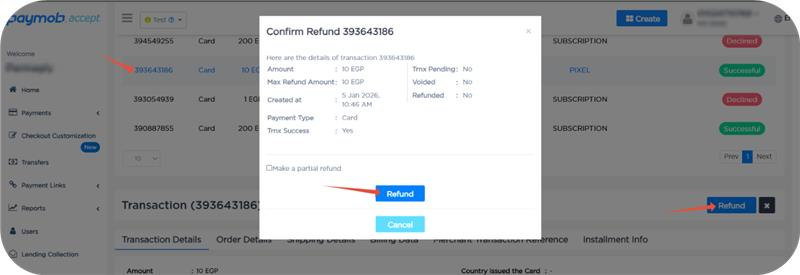
Full Refund
1
Select the successful transaction you want to refund
2
Click the Refund button, which will show the refund pop-up
3
Click the Refund button in the refund pop-up
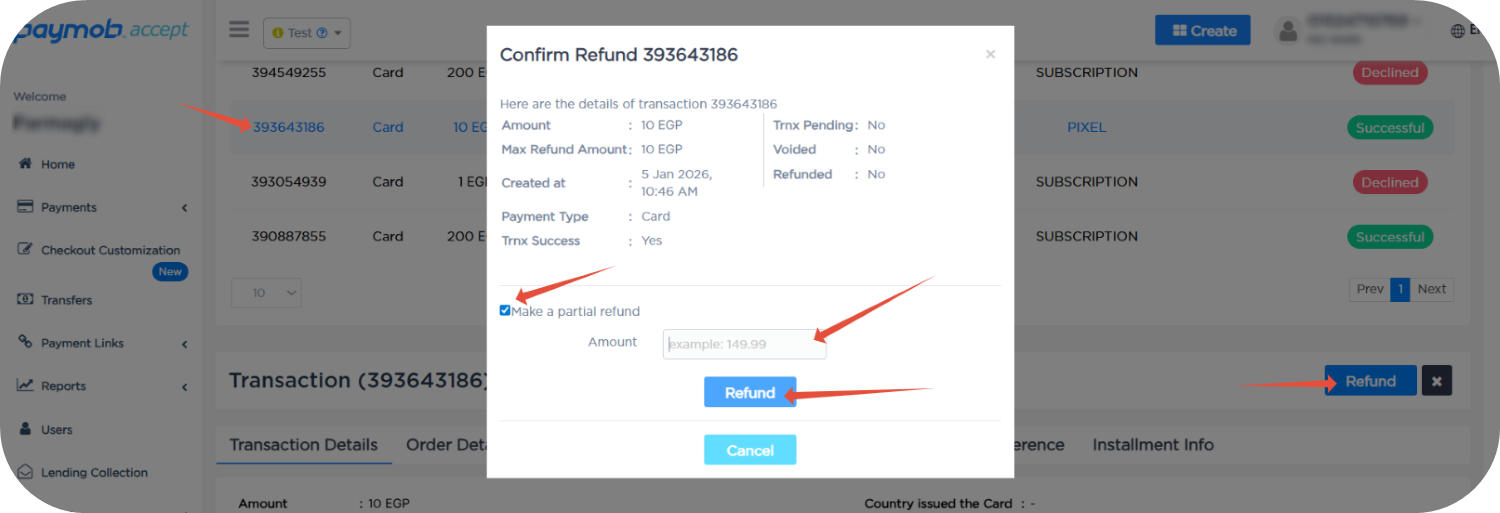
Partial Refund
1
Select the successful transaction you want to refund
2
Click the Refund button, which will show the refund pop-up
3
Click the Make a partial refund checkbox
4
Fill in the amount you want to refund
5
Click the Refund button in the refund pop-up


On this page
- Refund