Void

Who is this for - Product managers, business owners, and stakeholders who need a high-level overview of void transactions and how they are handled through Paymob
Outcome - Understand what void transactions are, when to use them, and how to initiate voids using the Paymob Dashboard.
What is a Void Transaction?
A void cancels a successful payment before settlement. Since the transaction is stopped early in the process, the funds are not transferred to the merchant, and the customer does not receive a separate refund. Mostly, it will be available on the same business day, before settlement occurs.

Common Use Cases
Voids are typically used when a customer cancels immediately after checkout

Payment methods that void is supported for:
Card payment method only
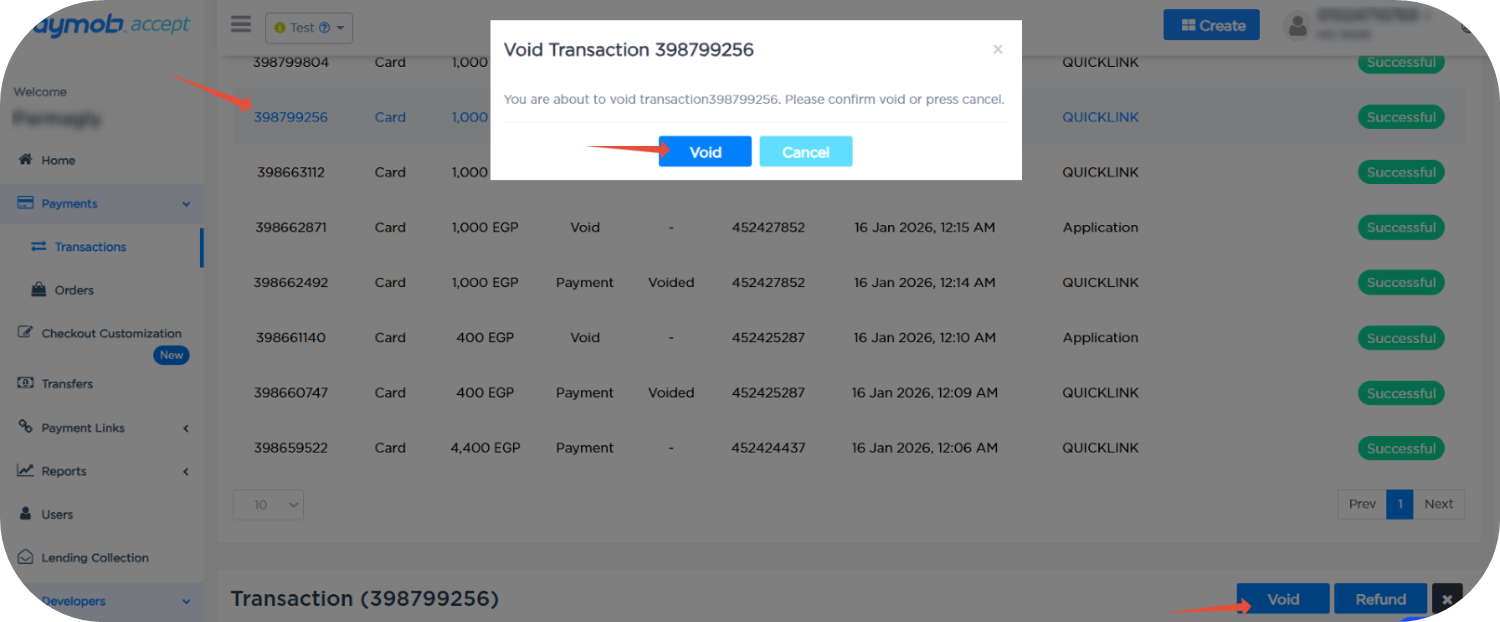
Dashboard Void
1
Select the successful card transaction you want to void
2
Click the Void button, which will show the void pop-up
3
Click the Void button in the void pop-up


On this page
- Void