CS-Cart

Who is this for - Merchants and non-technical users who want to accept online payments on their CS-Cart store using a ready-to-use Paymob plugin
Outcome - Explore, Install, and Configure Paymob's CS-Cart plugin
Last Updated Date - June 1, 2026
Overview
The Paymob CS-Cart plugin allows you to accept online payments securely on your CS-Cart store using Paymob’s payment gateway. It provides a smooth checkout experience for customers.
Installation Steps
1
Download the Paymob Cs-Cart Addon from the marketplace
2
Login into Cs-Cart admin panel, from the upper menu, click on Add-ons => Manage add-ons.
3
Click on the tools => settings icon in the upper right corner.
4
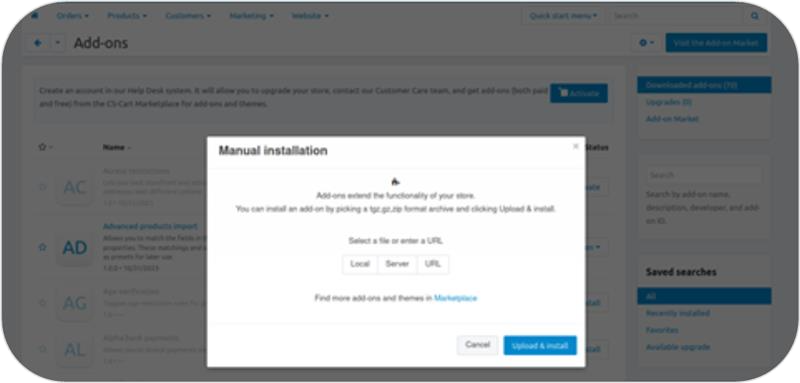
Choose Manual installation => Local and select the Paymob downloaded file .zip file, then click on the Upload & Install button.
5
The Paymob addon will appear on the Add-ons list.
Plugin Configuration
1
From the Cs-Cart admin panel, in the upper menu, click on "Administration" => "Payment Methods".
2
Click on the Add button on the top right to add the payment method.
3
You can name your payment method according to the one you need to add, and then choose Paymob in the "Processor" dropdown list.
4
Click on "Configure".
5
Add all the credentials needed by pasting each key in its place in the Paymob Cs-Cart setting page.
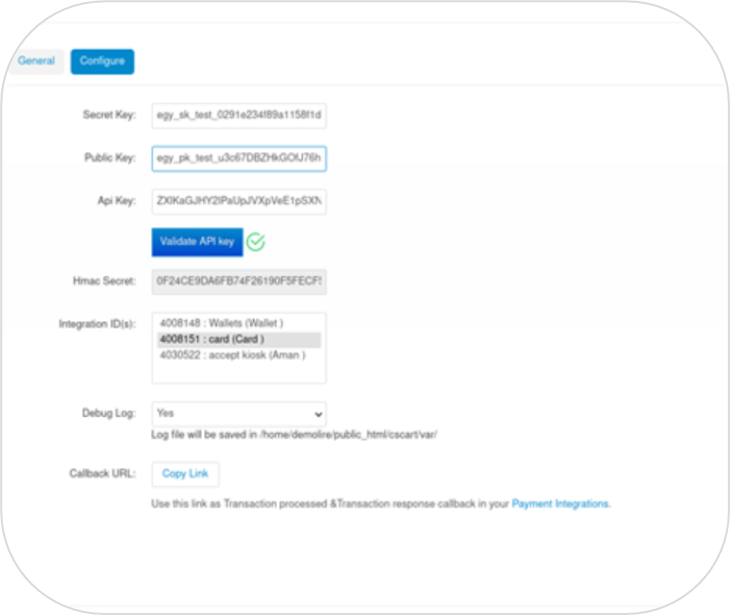
You can get all the credentials from your Paymob dashboard. Check the Getting Integration Credentials.
6
Click on the Validate PayMob API key button to ensure the data provided keys are valid and return the needed information.
7
Select the Integration IDs that you want to enable for your customers during checkout.
8
Copy the integration callback URL that exists in the Paymob Cs-Cart setting page. Then, paste it into each payment integration in the Paymob account.
You check the Getting Integration Credentials page for more guidance on how to update the callback URLs on the Paymob dashboard.
9
Save the changes.
To test the payment cycle, you need to use test credentials for Card and Wallet. Please check the Test Credentials page.


On this page
- CS-Cart